Be the business Google and AI recommends.
We fix the Google Business Profile, photos, reviews, service area pages, your website, and the key directories that drive hiring decisions. We tune and feed authoritative data to Google Maps, Search, AI Overviews, ChatGPT, and Gemini, we work methodically, by the rules to ensure your business is recommended first.
Roofers · Carpenters · Plumbers · Electricians · HVAC · Landscapers · Cleaners · Movers · Painters · and more
The work
We fix what is keeping them from recommending you.
A category. A page. A photo. A review. You make the change from the list, or we make it on Pro Managed. The next week you see whether Google and AI moved.
 Maps3-pack in 2 of 2 townsDoing well
 SearchPage 1 for 2 of 4Doing wellAI OverviewRecommends you in 2 of 4Doing well
 ChatGPTRecommends you in 3 of 4Doing well
 GeminiRecommends you in 0 of 4Needs work
 Business ProfileAll goodDoing well
Next for Sailacat: add the category Boat tour agency, add the missing photos, and publish the page for sunset sailing charters in The Hamptons.
Fix
The work gets done: by you in one click, or by us on Pro Managed.
- Add Boat tour agency to the Google Business ProfileOne click
- Write and publish the page for The HamptonsFrom real charters and reviews, published to sailacat.com
- Send review requests after each charterFrom the captain's phone, as guests leave the boat
What to change
The exact fixes, most important first: the service, the town and the Google Business Profile field.
- Add the category Boat tour agencySail Hamptons and Sag Harbor Charters use it. Sailacat doesn't.
- Add photos to the Google Business ProfileThe #1 in The Hamptons has 744. Sailacat has 90.
- Build a page: sunset sailing charters in The HamptonsNot on page 1 of Google for this search yet.
Proof it worked
After the fix, the map and the answers show whether they recommend you. Every number opens the search behind it.
Every week: the next fix, then the next check.
Built by Kevin Kemp, a Full Stack Developer with 25+ years of Technical SEO experience.
The fixes inside your dashboard
 Your dashboard
The fixes inside your dashboard
| Screen | The fix |
|---|---|
| Channels | Each place a customer looks ends in the change to make: the Google Business Profile field, the page, or the review. The score is there so you can see the change land. |
| Searches | Open any search a customer makes and see who was recommended instead of you, then build the page or correct the detail that lost it. Add your own keywords, or stop checking one. |
| GBP | Correct the category, hours, phone, photos and website on your Google Business Profile. The top 3 sit beside you so the missing piece is obvious. |
| Page builder | Write the page for the service and town you are losing, with your real jobs, photos and reviews, and publish it to WordPress in one click. |
| Services & towns | Choose the services and towns the fixes cover. Each town is searched from its courthouse, the point Google appears to use as the town's center. |
| Job done | Log a finished job and text that customer your Google review link from your own phone. A job photo with location on goes on the page for that town. |
| Support | Ask AnswerPins Experts anything and see every reply, right inside your dashboard. |
Where AI gets its answer
Fix the profile, the page and the reviews so they all say the same thing.
AI does not invent a local business. It reads your Google Business Profile, your pages and your reviews. When those disagree, it recommends a competitor. We correct the mismatch, then build whatever is missing.

Sailacat's Google Business Profile
sunset sailing charters near meAI Overview
You can book a private sunset sailing charter right out of Sag Harbor aboard the catamaran Sailacat, departing from Long Wharf.
Details: Private, fully crewed catamaran charters led by local Captains Kal and Brian 3, with water toys, a floating bar and a giant cooler with ice 2.
yelp.comsailacat.com/sunset-cruise 2
"Captain Kal and Brian were fabulous hosts! My friends and I had the best day ever on their boat."
Google's real AI Overview for "sunset sailing charters near me", searched from Sag Harbor, and the real sources it drew from, September 2026.
Sailacat gets recommended because the profile, the page and the review use the same words. Where yours do not, that is the fix.
Every field we correct on your Google Business Profile
Google Business Profile
Every field we correct on your Google Business Profile
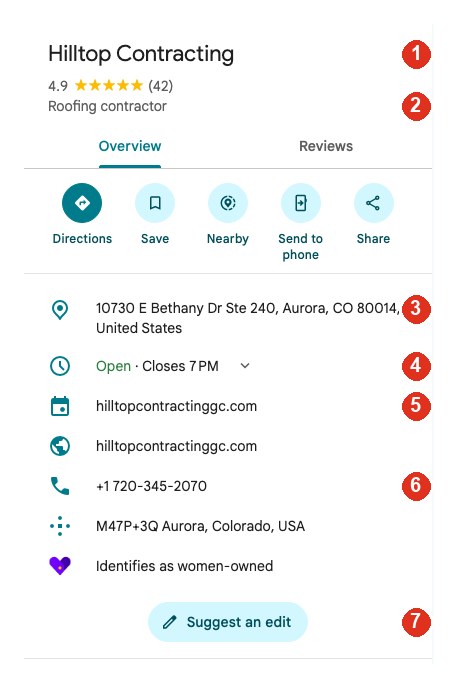
Your Google Business Profile is the listing customers see on Google Maps and beside Google search results. It is also the first place Google's AI Overview and ChatGPT look for your business details.
When you sign up, you confirm your business facts once. We then compare every part of your Google Business Profile with those facts.
- Business name. It must match the name on your signage, invoices and website. Adding extra words such as "Best Roofer Aurora" breaks Google's guidelines and can get a listing suspended.
- Primary category. This is the strongest signal Google uses to decide which searches you appear in. A roofer listed as "General contractor" competes for different searches than one listed as "Roofing contractor".
- Address and service area. Your base address, plus every town and ZIP code you actually serve.
- Hours. Including weekends and holidays. If your Google Business Profile shows "Closed" when a customer searches, Google tends to show someone who is open.
- Website and booking link. Each must point to a working page on your site, not an old or broken address.
- Phone number. The same number that appears on your website and on every directory listing.
- "Suggest an edit". Anyone can use this button to propose changes to your Google Business Profile, and Google sometimes accepts them without asking you. We check for these changes every day.
We also review your list of services, your business description, your photos, your reviews and how you respond to them.
What AI reads before it recommends a business
How AI decides
What AI reads before it recommends a business
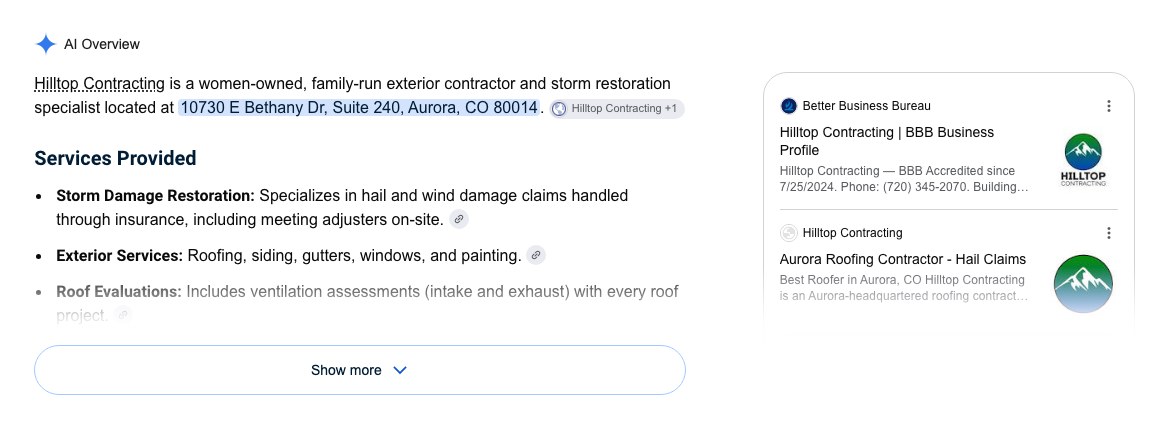
An AI answer is not written from scratch. Before Google's AI Overview or ChatGPT recommends a local business, it gathers what is already published about that business and checks whether the details agree.
In the real example above, the AI Overview quotes the address from the Google Business Profile and lists the Better Business Bureau profile and the company's own website as its sources.
| Source | What the AI reads |
|---|---|
| Your Google Business Profile | Name, category, services, service area, hours, phone number, reviews and your replies to reviews. |
| Citations (PHAB Monitor) | Better Business Bureau, Yelp, Angi and HomeAdvisor, Thumbtack, Facebook, Nextdoor, MapQuest and the trade-specific sites it cites for your industry — Phone, Hours, Address and Business name agreeing. |
| Your website | Pages about the service and the town in question, with details it can quote, such as completed jobs, prices, response times and licenses. |
| Your competitors' listings | The businesses Google shows near you. The AI compares you with them before it decides which businesses to recommend. |
When these sources disagree about your name, phone number, services or service area, the AI is less certain it has the right business, and it recommends a competitor whose details are consistent.
Your Google Business Profile
Fix the Google Business Profile the top 3 already have.
We compare the categories they use, update photos with meta-location data, and we correct the details that are wrong on your GBP. We answer reviews with specifics that are necessary to helkp your rank advance. On the Pro Managed plan, we make these changes and more for you. We know which fix is next. Compare the images below.
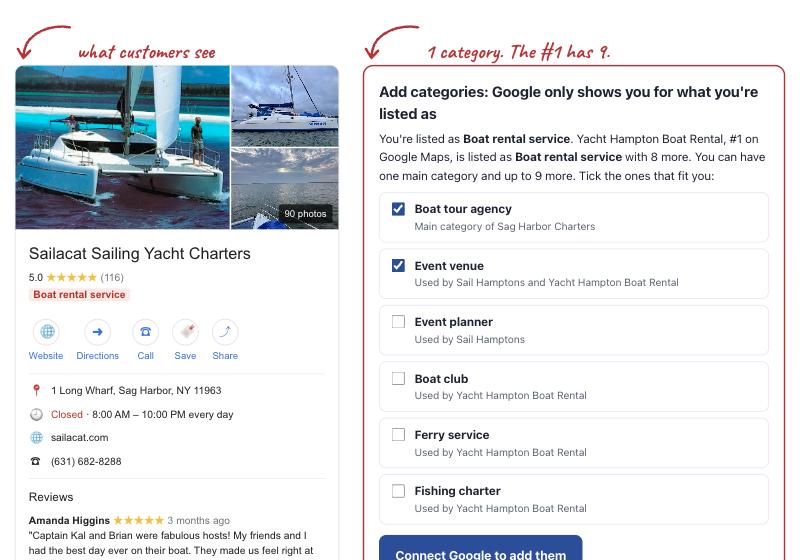
- Add the categories the top 3 use that you don't. You can have one main category and up to 9 more.
- Correct what Google needs: open status, hours for every day, phone, main category, website link, photos and reviews. We look every day and undo an edit you did not make.
- Catch up on reviews and photos. You sit next to the top 3, so a thin review count or a short photo set is the next job, not a mystery.
- Every change is dated, whether you made it, we made it, Google made it, or someone else did. We record exactly when the fix went through.
On Pro Managed, AnswerPins Experts make every Google Business Profile fix for you.
Your Pin Grid
Turn the red streets green.
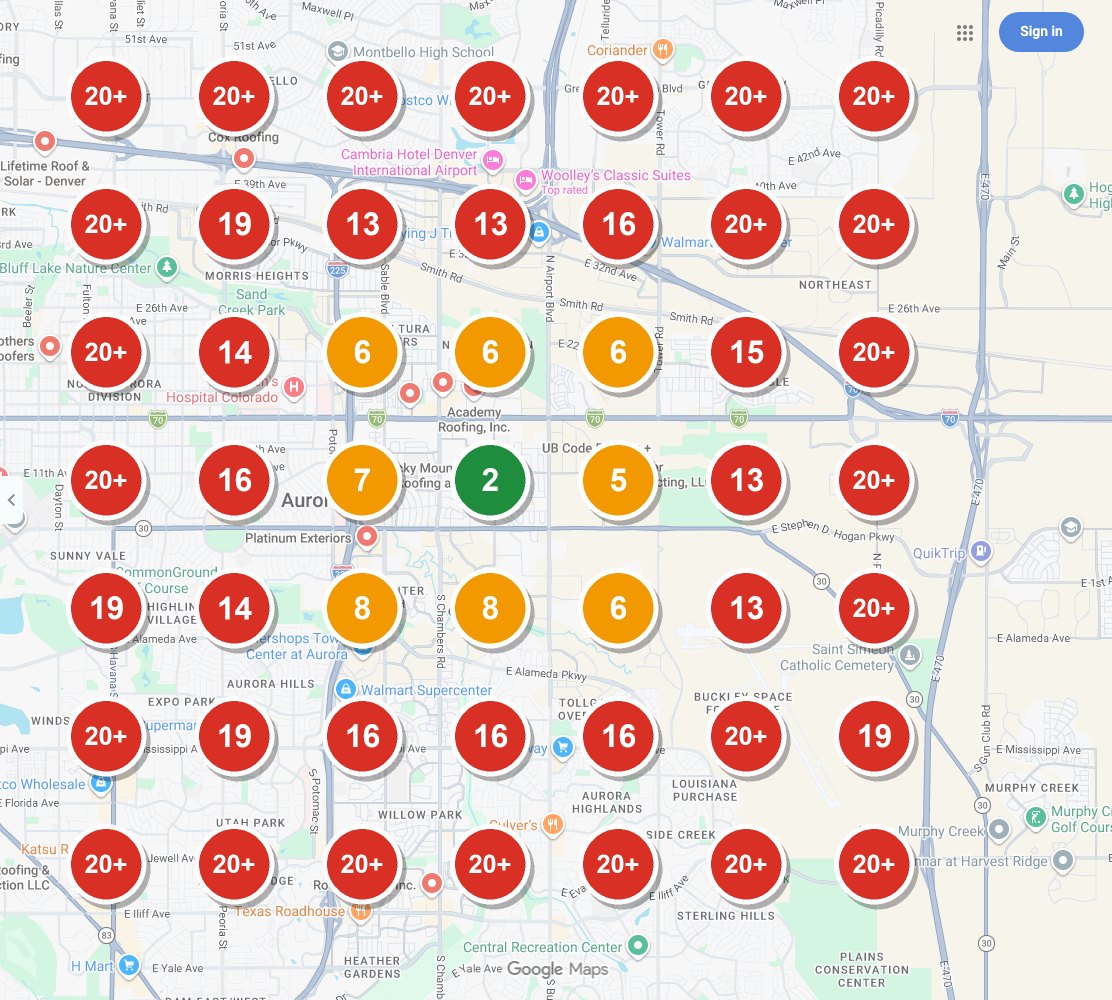
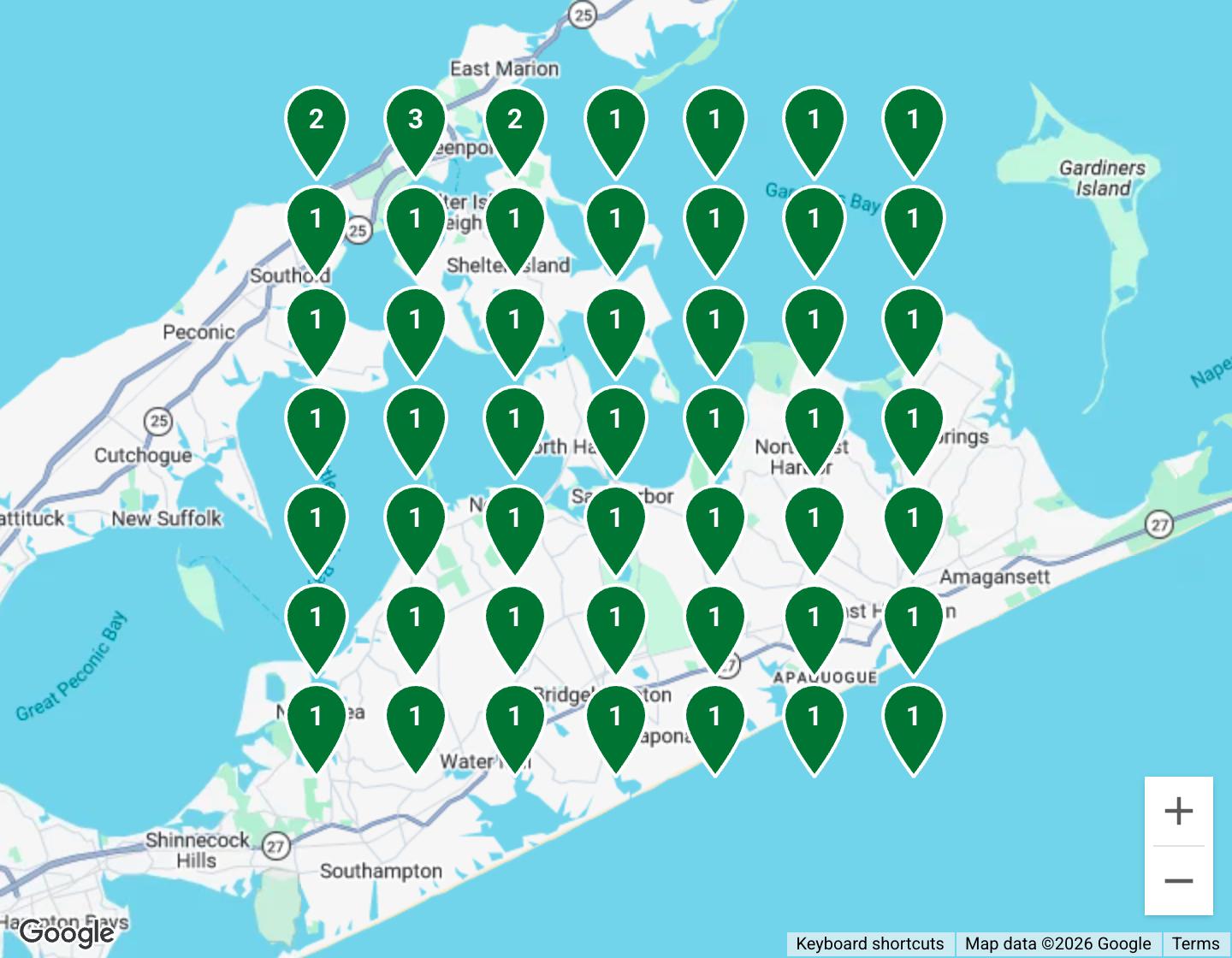
A red pin is a street where customers never see you, so AI will not recommend you there either. We fix the profile, the page and the reviews until that pin turns green. The map is how you watch the fix land. Green means they recommend you. Red means those customers still hire someone else.
Sailacat's real Pin Grid on Google Maps, Sag Harbor, NY, September 2026.
See how the Pin Grid works
Pin Grid
How the Pin Grid works
Google does not show every customer the same results. It ranks local businesses partly by distance, so a customer two miles away sees a different list from one next door. A single ranking number cannot show this. A grid can.
- We place 49 points across the area you serve, in a grid of 7 rows and 7 columns.
- From each point, we run the same search a customer standing there would run, such as "sunset sailing charters".
- Each pin shows your position on Google Maps from that exact spot. Tap a pin to see the three businesses Google shows there.
| Color | Position | What it means |
|---|---|---|
| Green | 1 to 3 | You appear in Google's map pack, the short list AI answers draw from. |
| Orange | 4 to 20 | You appear, but below the map pack. Few customers scroll this far. |
| Red | Not in the top 20 | Customers searching from this spot will not see you. |
The grid runs for each service, every week on Pro Managed and every month on Self Managed. Its job is to show the red areas turning green after the fixes.
Why the top 3 on the map matters to AI
The map pack
Why the top 3 on the map matters to AI
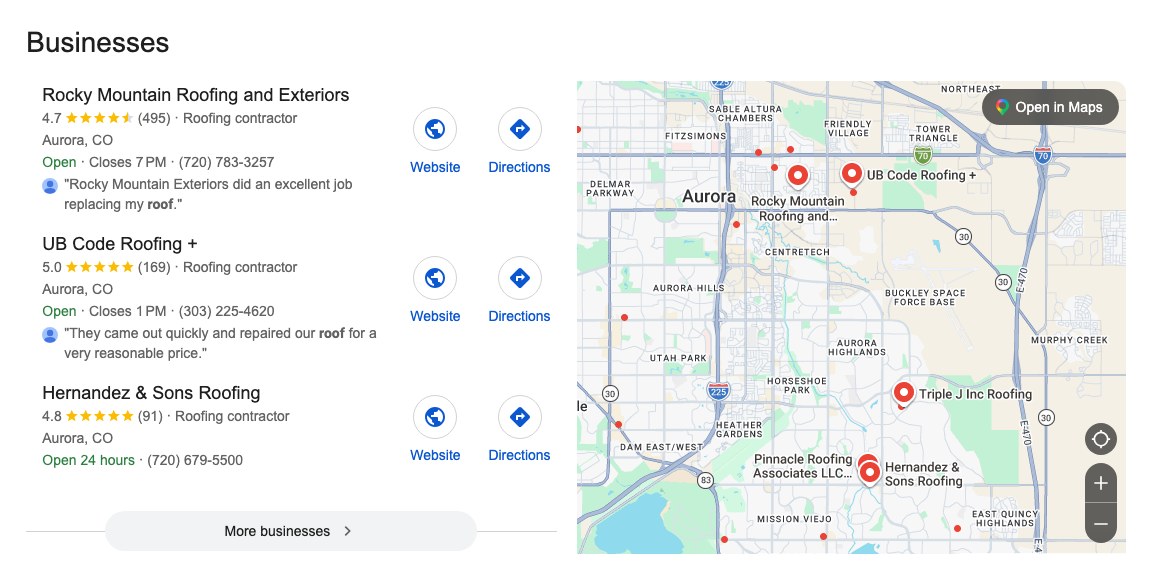
For most local searches, Google shows only three businesses beside the map. This is called the map pack. Google states that it ranks these listings on three factors:
| Factor | What it means |
|---|---|
| Relevance | How well your Google Business Profile matches the search. Your primary category, services and description decide this. |
| Distance | How far your business is from the person searching. This is why your position changes from street to street. |
| Prominence | How well known your business is, based on reviews, ratings and mentions across the web. |
The map pack matters for AI because Google's AI Overview draws on the same Google Business Profiles. Compare the map pack with the AI Overview at the top of the page: both show business cards with ratings, phone buttons and directions from the same listings.
Every red pin on your grid is an area where you are neither in the map pack nor likely to be recommended by AI.
Why searching yourself gives you a false read
Clean searches
Why searching yourself gives you a false read
When you search for your business from your office, your home or your phone, Google knows it's you. You're signed in, you've clicked your own listing many times, and you may have it saved. Google uses all of that to rank you higher for you. Your customers don't get that boost, so they don't see what you see.
| Your own search | Our search | |
|---|---|---|
| Signed in to Google | Usually | Never |
| Search history and past clicks | Yours, full of your own business | None |
| Cookies | Yes | None |
| Searched from | Wherever you happen to be | The exact spots your customers are, dozens across your area |
We pay for clean data that is supplied by and extracted from Google and other AI databases. Each result is what a stranger standing at that spot sees. That's the only fair read of where you rank.
For web designers: checking a client's ranking from your own browser, even in a private window, still uses your location and device. A clean search from where the customers are is the only way to know.
Add a city
Get found by people searching your town from somewhere else.
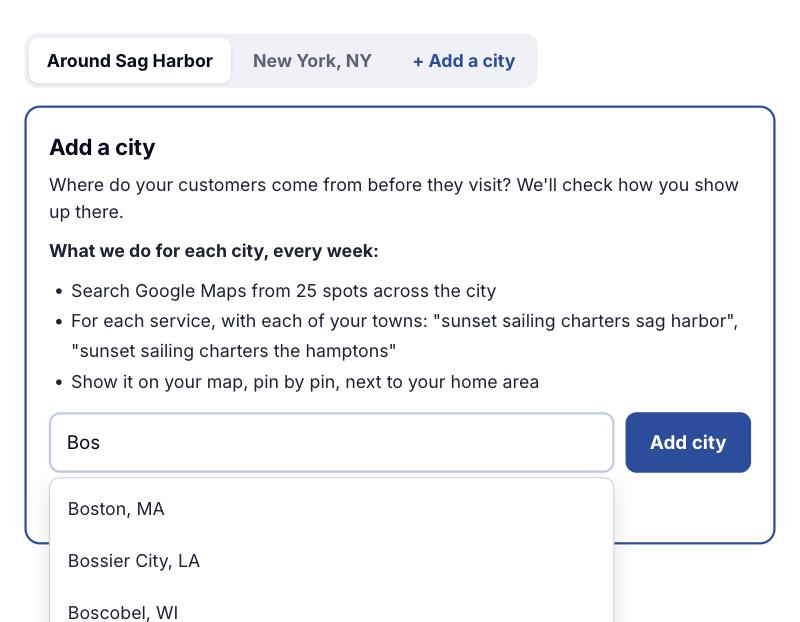
Two people can type the same words: "plumbers in Neptune Township." One is in New York. The other is standing in Neptune. Google shows them different businesses, because it also uses where each person is. Add a city searches from New York, the way that customer does, so you see who Google shows them, and you can fix it.
-
A house in another town
They live in New York and keep a place on the Jersey Shore. From the city, they search for a plumber in Neptune Township before they drive down. The work is in Neptune. The search happens in New York.
-
A trip
A charter, a rental, a tour, a cleaner for the week they are there. They book it from home, often weeks ahead, with your town typed into the search.
-
A move
They still live in the old city and are hiring for the new one. Movers, a painter, a plumber for a house they have not moved into yet.
-
Someone else's place
A parent's house, a rental they manage, a job site. They are not in the town, but the job is. If your customer is in one place and the work is in another, that city belongs here.
Same words. A different list.
Google measures distance from the person searching, not only from the town they typed. So the map it draws, and which businesses are close enough to show, change with the city they are in. A rank you see from your own town is not the rank they see.
- You name the city they search from. New York for a Shore house, Boston for the Cape, Chicago for a move to a town nearby.
- We search from that city, with your town in the words, the way they type it. "Plumbers in Neptune Township" from New York. "Sunset sailing charters Sag Harbor" from New York.
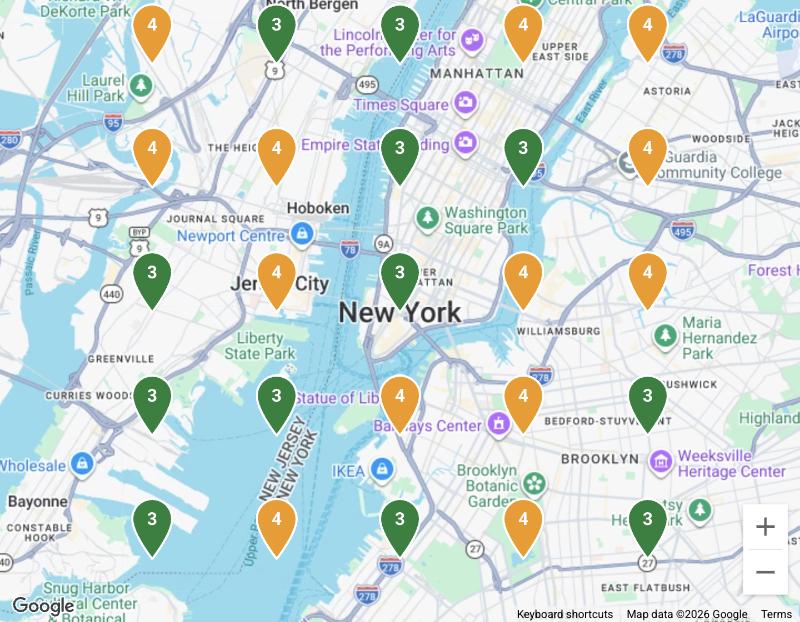
- That city gets its own map, next to the map of your home area. Green there means those people see you. Red means they hire someone else.
Add a city is not a service page.
Add a city is the check
It asks Google from the other city and shows you whether those people see you. It does not write anything on your website. $39 a month for each city, on either plan.
A service page is a fix
It is a page on your site about the work you do in a town, with the jobs, photos and reviews that prove you were there. You can need that page for a town you already cover from home, with no extra city. When people search from somewhere else, the page is often what changes their list. How we build those pages
Add a city as an add-on for $39 a month when the customer is in one place and the job is in another.
Why the same words return a different list
Add a city
Why the same words return a different list
Someone in Chicago types "best sushi in San Diego" because their phone's location cannot tell Google they want San Diego. They put the place in the words. Google calls this explicit local intent: the search itself names the place, even though the person is somewhere else. A second home, a trip, a move and a parent's house all work this way.
Naming the place does not freeze the list. Google still ranks local businesses by how far they are from the person searching, along with how well the listing matches and how well known the business is. Move the person from Neptune to Manhattan and the distance changes, so the businesses Google is willing to show can change too. Two people can type "plumbers in Neptune Township" and not see the same three names.
- Add the city they search from, such as New York for a house in Neptune Township, or for a Sag Harbor charter.
- We run the search from that city, with your town in the words, the way they type it.
- You get a map of that city, next to the map of your home area. The fixes are the same ones: the profile, the page for that town, and the reviews. The map shows whether their list moved.
How it works
Three steps. No tech skills needed.
-
We fix what's wrong
Your Google Business Profile, and the same Phone, Hours, Address and Business name on Yelp, BBB, Angi, Thumbtack and Facebook. The industry calls those listings citationsA citation is your business listed on another site, such as Yelp or the BBB. PHAB Monitor is how AnswerPins does that work: Phone, Hours, Address, Business, started by hand and monitored. You own the logins. People associate the reviews with how PHAB you are.. We do them with PHAB MonitorPHAB is Phone, Hours, Address, Business. The old term was NAP. We nab. PHAB Nabber claims the listing. PHAB Monitor watches the four facts. Found one. Nabbed it.. Own it. Start it. Found one. Nabbed it. You get a plain list. On Pro Managed, we make every fix.
-
We build the page and get the review
A page that proves you worked in that town, and a review request ready to text the moment the job is done.
-
We check again next week
The same customer questions go to Google Maps, Google, ChatGPT, Gemini and the AI Overview. You see the week they start recommending you.
Too busy on the job? On Pro Managed, AnswerPins Experts do all the fixing for you.
Own it. Start it. Found one. Nabbed it.
PHAB Monitor
Own it. Start it. Found one. Nabbed it.
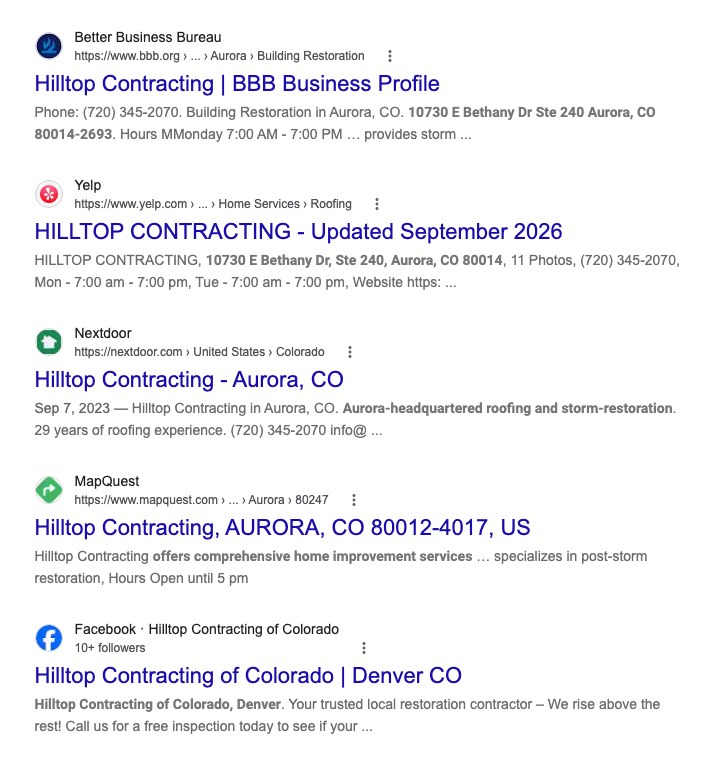
Search for any business the AI recommends and you will usually find the same pattern: its name, address, phone and hours are identical on every major directory. That consistency is what gives the AI confidence it has the right business.
The industry name for one of these listings is a citation. We still say that word, so you can compare us with BrightLocal and Whitespark. What we sell is not their citation dump. PHAB Nabber finds the hole and claims the listing by hand. Found one. Nabbed it. PHAB Monitor then watches Phone, Hours, Address and Business name until they match. You own the logins.
People read the reviews on those sites. AI reads them too. They only associate those reviews with you when your PHAB matches. Wrong phone, old hours, a name that is not quite yours, and the review is just text on a page that is not quite you. That is how PHAB your business really is.
The old local-SEO term is NAP: Name, Address, Phone. It left hours out. A Saturday call to a listing that says Open, when you closed at noon, is a lost job. AI reads the same mismatch. PHAB puts Hours in, and Business name last, so you can remember the four facts we monitor.
We nab and monitor your PHAB on each of these sites:
- Google Business Profile
- Better Business Bureau (BBB)
- Yelp
- Angi and HomeAdvisor
- Thumbtack
- Nextdoor
- MapQuest and Apple Maps
- Trade-specific sites and directories that AI references for your industry. Like Yelp, Angi, for contractors or Trip Advisor for tourism related services.
PHAB Monitor checks four things on each site: Phone, Hours, Address, Business name. Every mismatch goes on your fix list with a direct link to the listing.
Starting those listings is a $199 one-time PHAB Monitor add-on for monthly customers. We submit within 2 weeks. Some directories take up to 4 weeks to approve. You own the logins.
Why isn't this included, and why don't you submit to 500 directories like BrightLocal?
Because it is handmade, and because most of those 500 sites are useless. A citation mill pads a report. PHAB Monitor starts a short list and monitors four facts until they match your Google Business Profile. BrightLocal and Whitespark sell bulk citation builds — hundreds of directories, much of it automated, much of it Hotfrog and Brownbook, which ChatGPT and Google never read. Yext and Moz Local push a feed and often rent the listing: stop paying and it is theirs. We claim the directories AI actually cites, by hand, and you keep the logins. That takes time, so it is a value-added add-on for people already on a monthly plan. We will not sell it as a one-off to someone without an account. We do not resell BrightLocal, Whitespark, Yext or Moz Local.
| Site | Phone | Hours | Address | Business |
|---|---|---|---|---|
| Wrong | Wrong | Match | Match | |
| Yelp | Match | Match | Match | Match |
| BBB | Match | Missing | Match | Old name |
| Angi | Old number | Match | Match | Match |
| Thumbtack | Not listed | Not listed | Not listed | Not listed |
| Match | Match | Old address | Match |
PHAB Monitor finds it. PHAB Nabber: found one. Nabbed it.
On the Pro Managed plan, AnswerPins Experts make the corrections for you.
We undo edits someone else makes to your profile
Daily watch
How we watch your Google Business Profile every day
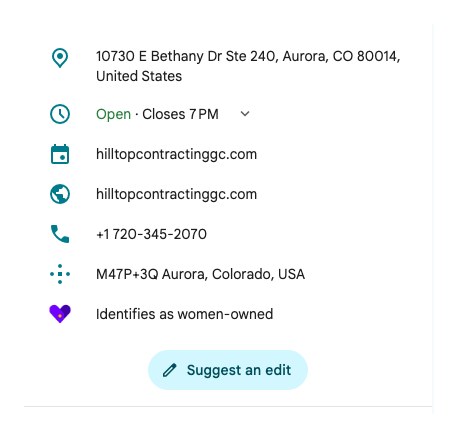
Your Google Business Profile can change without you touching it. Any Google user can press "Suggest an edit" and propose a new phone number, new hours or even a new business name.
Google reviews these suggestions automatically and often publishes them without notifying the owner. Google also updates listings on its own from other sources it finds on the web.
We read your Google Business Profile once a day and compare it with the facts you confirmed at signup. When something changes, you hear about it the same day.
- Monday, 9:00amYour Google Business Profile is checked. Every field matches. Match
- Tuesday, 9:00amYour Saturday hours have changed to "Closed" after a suggested edit. We flag the change. Flagged
- Tuesday, 9:05amYou receive an email showing what changed, what it should be, and how to correct it.
- Tuesday, middayThe hours are corrected. Fixed
Example timeline.
On the Pro Managed plan, AnswerPins Experts make the correction for you.
The old way vs 2027, side by side
The old way vs 2027
Getting ranked is not the same as getting recommended
For twenty years, local marketing meant climbing Google's list of blue links. That list is now pushed below an AI answer that recommends a handful of businesses directly. The work that gets a business recommended is different from the work that got it ranked.
| The old way | 2027 | |
|---|---|---|
| What gets done | A monthly report of keyword positions in the blue links. | The profile, the directories, the town page and the review are corrected. The weekly check shows whether AI now recommends you. |
| Google Business Profile | Set up once and rarely touched again. | Corrected field by field against your confirmed facts, then watched every day so a bad edit gets undone. |
| Citations | Bulk citation builds on hundreds of sites that customers and AI never read. NAP: name, address, phone. Hours left out. Reviews float unattached. | PHAB Monitor: handmade listings on the directories AI cites for your trade. Phone, Hours, Address, Business — monitored until they match, so people and AI can associate the reviews with you. You own the logins. |
| Service area pages | One page copied for every town, with only the town name changed. | A dedicated page for each service and town where the AI currently recommends a competitor. Each page includes proof of real work in that town, such as completed jobs, photos and customer reviews. |
| Existing pages | New pages are added alongside old ones, which then compete with each other. | Old pages are replaced or redirected to the new ones, so their Google rankings carry over. |
Your Google Business Profile, field by field
Profile audit
Your Google Business Profile, field by field
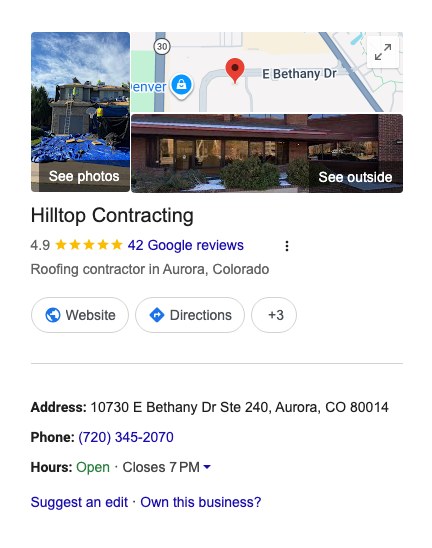
Your Google Business Profile appears in two places: on Google Maps, and in the panel beside the search results when someone searches your business name. Both show the same information, so one mistake appears everywhere.
When you sign up, you confirm your business facts once. We then compare your Google Business Profile against them, field by field, and mark each one.
| Field | Your Google Business Profile | Your confirmed facts | Result |
|---|---|---|---|
| Business name | Summit Roofing Co. | Summit Roofing Co. | Match |
| Primary category | General contractor | Roofing contractor | Fix |
| Phone | (303) 555-0188 | (303) 555-0142 | Fix |
| Saturday hours | Closed | 8am to 2pm | Fix |
| Service area | Aurora | Aurora, Centennial, Parker | Add 2 towns |
| Services | 3 listed | 5 offered | Add 2 services |
Example findings.
Every "Fix" becomes a step on your to-do list, with instructions and a direct link to the setting in your Google account.
On the Pro Managed plan, AnswerPins Experts make the fixes for you.
Your web pages
We replace the town pages Google and AI skip.
Copying one page and swapping the town name does not get you recommended. We write a page that proves you worked in that town, with the jobs, the photos and the reviews, and we put it where the old page was so you do not lose your Google rankings.
Summit Roofing is the best roofing company in Aurora. We offer roof repair and roof replacement in Aurora. Call today for roofing in Aurora.
Summit Roofing is the best roofing company in Centennial. We offer roof repair and roof replacement in Centennial. Call today for roofing in Centennial.
Spot the difference? Only the town name. Google calls these "doorway pages" and AI skips right past them.
So who does Google show instead?
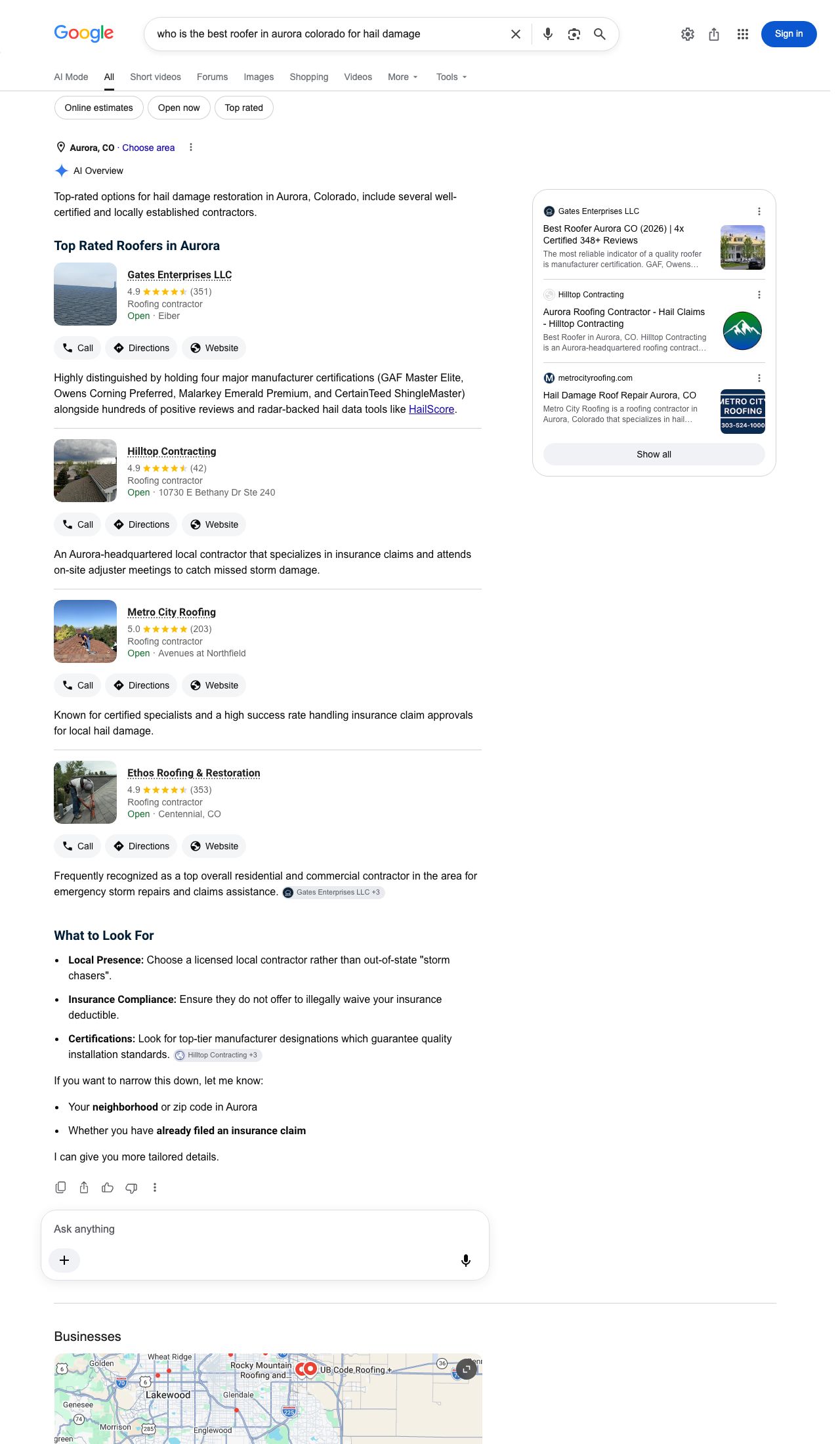
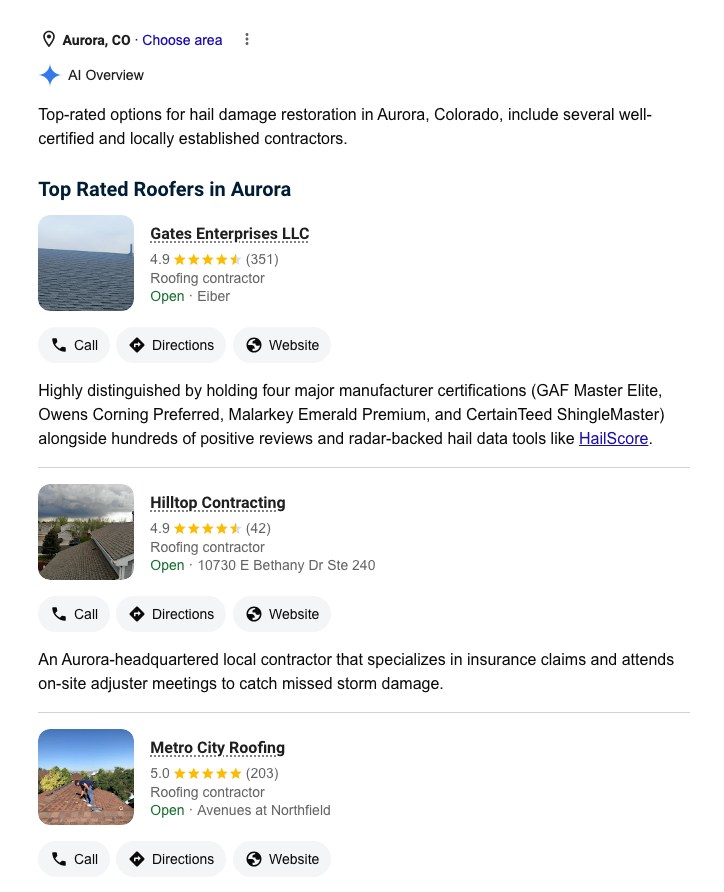
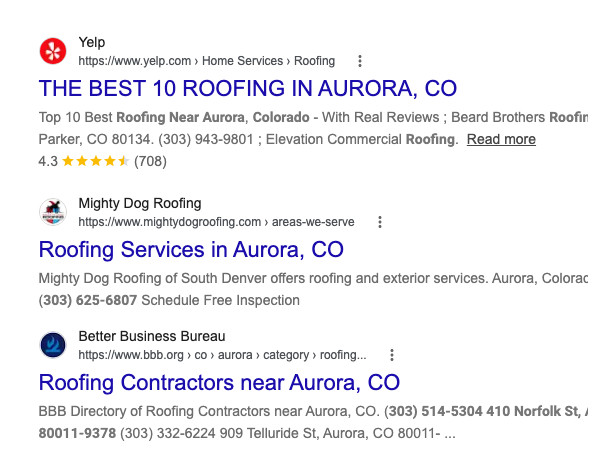
This is the real Google page for "roofer near me" in Aurora today. Yelp, a competitor's Aurora page and the BBB. None of the copy-and-paste town pages made it.
If your pages look like the ones above, your customers are reading about someone else right now.
After the June 2026 hailstorm we replaced 41 roofs in Centennial, including homes near Cherry Knolls Park. Here's the Hendersons' roof on S. Holly St, before and after.
You won't lose your Google rankings.
If an old page already ranks, the new page goes at the same web address. Every other old address is pointed to its new page, so no link breaks and nothing you've earned is lost. We keep a copy of every old page too.
Build each page in the Page builder, with your real jobs, photos and reviews, and publish it to WordPress in one click.
On Pro Managed, we do all of it for you.
/centennial-roofer/roofing-centennial/service-areas/centennial/roofing-centennial/hail-repair/hail-damage-roof-repair-centennialSee exactly how we swap your old pages
Replacing old pages
How we replace your old pages
/centennial-roofer/service-areas/centennial/roofing-in-centennial-co/roofing-centennialnew page, keeps their rankingsMost contractor websites already have service area pages, often several for the same town under slightly different addresses. Simply adding new pages beside them splits Google's attention between near-duplicates and can lower the rankings you already have. We replace them in six steps:
| Step | What we do |
|---|---|
| 1. Inventory | We list every existing service and town page from your sitemap and a full crawl of your site, along with any rankings and links each page has. |
| 2. Keep what ranks | If an old page already ranks for that service and town, the new page is published at the same address, so the ranking stays exactly where it is. |
| 3. Redirect the rest | Every other old address is permanently redirected (a 301 redirect) to the new page. Visitors and Google are forwarded automatically, and Google transfers the old page's ranking signals to the new one. |
| 4. Update internal links | Your menus, footer, links between pages and XML sitemap are updated to point to the new pages directly. |
| 5. Keep a copy | Every page we change is saved as a WordPress revision, so it can be restored at any time. |
| 6. Check for errors | After each change we test every old address and internal link for broken links and "page not found" (404) errors. |
On the Pro Managed plan, AnswerPins Experts carry out every step. AnswerPins Experts have maintained WordPress sites for over 25 years.
The redirect map
Redirect map
The redirect map
Before we change anything, you receive a redirect map: a complete list of your old page addresses and exactly what will happen to each one. Nothing is moved until you have seen it.
| Old page address | New page address | Action |
|---|---|---|
/roofing-centennial | /roofing-centennial | Rebuilt at the same address |
/centennial-roofer | /roofing-centennial | 301 redirect |
/service-areas/centennial | /roofing-centennial | 301 redirect |
/hail-repair | /hail-damage-roof-repair-centennial | 301 redirect |
Example redirect map. The first page keeps its address because it already ranks.
A 301 redirect tells browsers and Google that a page has moved permanently. Anyone who follows an old link, whether from Google, a bookmark or another website, lands on the new page instead of an error. Google transfers the old page's ranking signals to the new address, so the ranking you have built is not lost.
Each week
Two ways customers find you. We fix both.
Google Search Results
What people type → where you rank → the fix
SEO is your spot on Google Maps and in the Google results when someone types a search, like "sunset sailing charters sag harbor", or "sunset sailing charters near me" from the middle of each town. If you are not there, we correct the profile or build the page that wins that search.
AI Answer Results
What people ask → who gets recommended → the fix
AEO is whether ChatGPT, Gemini and Google's AI Overview recommend you when a customer asks, like "who runs the best sunset sail near Sag Harbor?" If they name someone else, we change the page, the profile or the reviews that answer used.
The fix, then the proof.
When a competitor gets recommended instead of you, we build the page, correct the profile, or get the review that wins it back. The same questions go out every week, for every service and every town, so you can see the week the answer changes.
| Customer searches | Where | Sailacat |
|---|---|---|
| sunset sailing charters near me | Google Maps | #1 |
| sunset sailing charters near me | Google AI Overview | Recommended first |
| bachelorette sails sag harbor | #1 | |
| sunset sailing charters | Google Maps, 49 spots | #1 at 46 |
The questions we write a fix for
Weekly questions
What we ask and what we keep
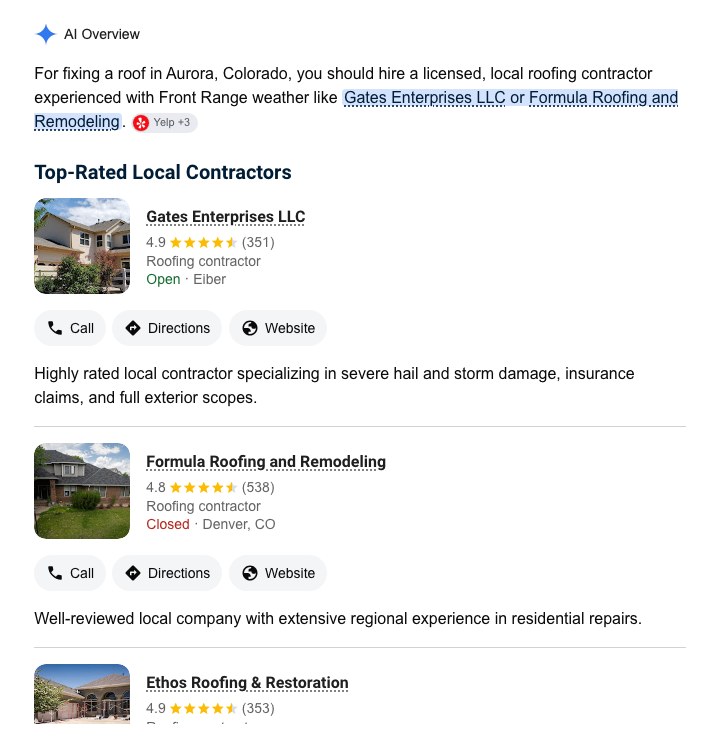
These two real answers were captured in the same town on the same day. The questions mean almost the same thing, yet the AI recommended different businesses. Checking one question is not enough, so we check every common way customers ask, for every service and every town you serve.
| Type of question | Example |
|---|---|
| Find | "roofer in Aurora" |
| Best | "best roofer in Aurora" |
| Urgent | "emergency roof leak repair Aurora" |
| Cost | "how much does a new roof cost in Aurora" |
| Trust | "licensed and insured roofer in Aurora" |
We build the list from your services and towns, and you approve it before the first check runs. Self Managed plans cover 3 services across 5 towns, and Pro Managed plans cover 5 services across 10 towns.
Each week we ask ChatGPT, Gemini and Google's AI Overview every question on the list and save:
- the full answer, word for word
- every business recommended, in the order it was recommended
- your position, or "not recommended"
- the websites the AI cited as sources
Each answer ends in the next fix
The next fix
Each answer ends in the next fix
Every question ends on the change to make. The answer is saved so you can see that the change worked:
Example. The last line is the fix. Business names are illustrative.
| What you get | Why it matters |
|---|---|
| The next fix | The page to publish or the detail to correct, based on what the AI cited and what is missing. |
| Who was recommended, in order | You see your place: first, second, third, or not recommended. |
| The full answer from each engine | You read exactly what your customers read, word for word. |
| The websites cited | They show where the AI got its information, so the fix goes there. |
| The change since last week | You see the week the AI starts recommending you. |
After every job
Get the review the minute the job is done.
Tap Job done, type the customer's name and number, and the review request is ready to text from your own phone, with your Google review link already in it. Ten seconds, while they're still happy.
Take your job photos with your phone's location on. Google reads the location meta location/GPS data stored in the photo. That is proof you worked in that area, and it raises your position there.
"Hi Maria, thanks for sailing with Sailacat! If you had a great time, would you leave us a quick Google review? It really helps us."
Job photo, taken in Sag Harbor
On Pro Managed, we send your review requests every month, and every two weeks while a rival is ahead on reviews.
Why now
AI is slow to learn. What it learns now, it says in 2027.
The fixes you make now are what AI will still be saying in 2027. It takes weeks or months to pick up a new fact. Make the corrections before your competitors do, while the old Google links are still alive, and we do optimize them as we always have, they are fading.
Why AI takes weeks or months to learn a change
Why now
Why AI takes weeks or months to learn a change
AI answers are built from information the engines have already collected about your business. When you correct something, the change has to be picked up by each source the AI relies on before the answer itself changes.
Timings vary by engine, market and how many sources are corrected.
This delay works both ways. Businesses that correct their information now will be the ones the AI has learned to trust by 2027. Businesses that wait will be competing to replace names the AI already recommends.
Who it's for
If customers hire you from Google Maps, this is for you.
- Roofers
- Carpenters
- General contractors
- Remodelers
- Plumbers
- Electricians
- HVAC
- Landscapers
- Tree services
- House cleaners
- Carpet cleaners
- Pest control
- Movers
- Painters
- Flooring
- Garage doors
- Locksmiths
- Pool services
- Pressure washing
- Window cleaning
- Junk removal
- Handymen
- Fencing
- Concrete
- Solar
- Auto repair
- Towing
- and more
This actually happened
[This isn't a theory. It's the scoreboard from a local business that did it.]
[Three sentences: which business, what AI now says about it, and how the numbers moved.]
- [000+]
- [times named by ChatGPT]
- [00]
- [towns where AI names the business]
- [00]
- [calls a week from AI answers]
- [$0]
- [spent on ads to get there]
[One or two sentences on the business these results come from: its trade, its town, and where it started.]
Built by a Xoogler, not a marketing agency.
Hi, I'm Kevin.
A full stack developer and former Google employee, or "Xoogler," as we are called.
The rise of AI also saw a rise in "BS" from "SEO Experts" who added "AI search" to their invoices. Just the invoices.
AnswerPins cuts through the BS. Step by step. Explaining in detail and delivering tangible proof each week. Not a monthly cookie cutter report.
What owners say
[Owners in different trades, recommended by AI.]
“[What the customer said, in their own words.]”
“[What the customer said, in their own words.]”
“[What the customer said, in their own words.]”
Questions
Straight answers.
I already pay an SEO company. Why this?
Most SEO companies send a monthly report of rankings. We correct your Google Business Profile, your directory listings and your town pages, and we ask for the review after the job. The weekly check is there so you can see whether AI now recommends you.
What will I see when I log in?
The next fixes: a Google Business Profile field, a page to publish, or a review to request. Behind each one are the six places customers look: Google Maps, Google search, the AI Overview, ChatGPT, Gemini and your Google Business Profile, marked Doing well, Getting there or Needs work.
What's the difference between SEO and AEO?
SEO is the fix for people who type into Google: your spot on Google Maps and in the results. AEO is the fix for people who ask AI, like ChatGPT, Gemini or Google's AI Overview. Customers do both, so we correct both, then check both.
Do you text my customers?
No. You tap Job done and the message opens on your own phone, ready to send, so it comes from you. On the Pro Managed plan, we can handle review requests for you.
Do I need to be good with computers?
No. The dashboard is easy to use and AnswerPins creates a to-do list. The dashboard has all the tools you need to complete the tasks on the list. On the Pro Managed plan, we do the work for you. It's a simple $100 upgrade. Then your site is handled by seasoned experts.
What happens to the web pages I already have?
Pages that already rank keep their web address. Old addresses point to the new pages, so nothing breaks and you don't lose rankings. We keep a copy of every old page.
How fast will AI start naming me?
Nobody can promise a date. Make the fix now. AI picks it up over weeks or months. We ask again every week, so you see the week it happens.
My website isn't WordPress. Does it still work?
Yes. We still correct your Google Business Profile, and we hand you the new pages to add to your site. The weekly check works the same.
Do you build citations on hundreds of directories?
No. BrightLocal and Whitespark do that. A citation is your business listed on another site. We still use that word. PHAB Nabber claims the real ones: found one, nabbed it. PHAB Monitor watches Phone, Hours, Address, Business until they match. People and AI only associate the reviews with you if your PHAB matches. Angi and Houzz for plumbers, Healthgrades and Zocdoc for dentists. You own the logins. It is a $199 one-time add-on for monthly customers. We will not sell it to anyone without a monthly account. We submit within 2 weeks; some directories take up to 4 weeks to approve. We do not resell BrightLocal, Whitespark, Yext or Moz Local. How we compare to them, and to Yext, Moz Local, Birdeye, Semrush and Local Falcon.
Can I cancel?
Yes, anytime, in your account. No contract.
Pricing
Try it for 3 days for $1.
Self Managed
You make the fixes from a plain list.
$149/month
3 days for $1 first
Start for $1- 3 services in 5 towns
- Google Business Profile fix list
- Unwanted Google edits flagged the day they happen, so you can undo them
- New town pages, one click to publish
- Job done: the review request, ready to text
- You beside the top 3, so the missing category, reviews and photos are obvious
- The next week's check of Google Maps, Google search, ChatGPT, Gemini and the AI Overview
- Support from AnswerPins Experts inside your dashboard
- Replace your old service area pages Replacing live pages the wrong way can drop your Google rankings and lose the calls you already get. Old addresses must point to the new pages and every link must be tested. On Pro Managed, we do this for you. Read supplied documentation and ask for help before taking risks.
Pro Managed
We make the fixes. You stay on the job.
$499/month
Get started- Everything in Self Managed
- 5 services in 10 towns
- We fix your Google Business Profile
- We build the page wherever a competitor is getting recommended
- Every job done within 72 hours
- We send your review requests for you
- We undo unwanted Google edits
- We replace your old pages without losing rankings
Add a city: $39 a month per city, on either plan. For anyone searching your town from somewhere else: a second home, a trip, a move, or a place they look after. Who it is for
PHAB Monitor: $199 one-time, monthly customers only. Own it. Start it. Found one. Nabbed it. PHAB Nabber claims the listing. PHAB Monitor watches Phone, Hours, Address, Business. What that means
Built for live websites
Built by an engineer with 25 years on live business websites
AnswerPins is built and run by Kevin Kemp, who has kept business WordPress websites running for over 25 years. The difficult part of this work is not writing pages. It is changing a live business website without breaking what already works, and that is where the experience shows.
Get found on Google. Get recommended by AI.
Put in your website address. We'll start with what Google and AI are reading wrong.